


Keybindings
Keybindings can be shown and hidden at any time by pressing
F11.
Wildlander & Skyrim Keybindings
The following is the complete list of keybindings for Wildlander. Keybindings can be shown and hidden at any time in-game by pressing F11.
Visual Reference
Version 1.1 Keybindings: 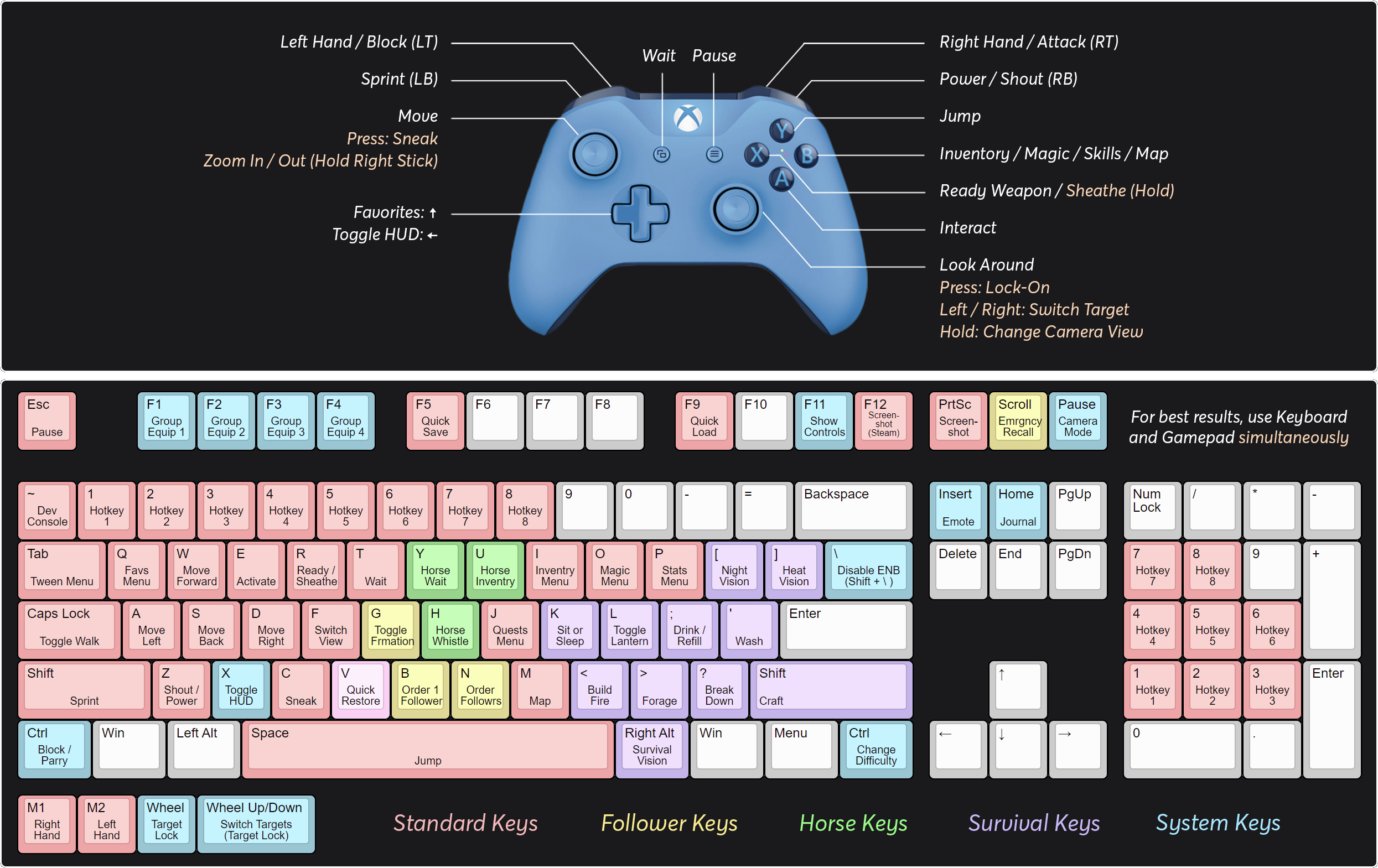
Version 1.0 Keybindings: 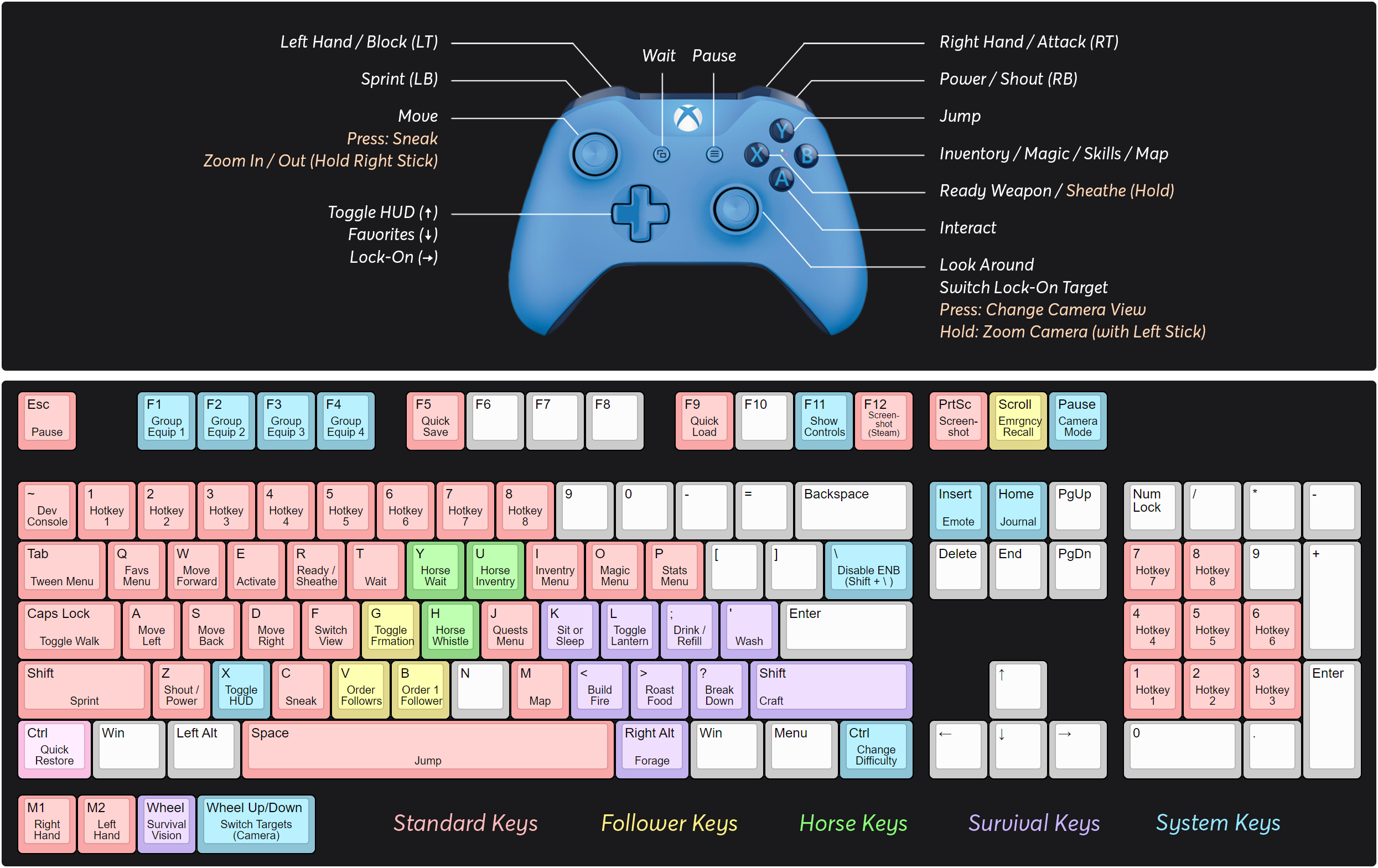
Complete Keybinding List
| Function | Key | Source / MCM | Effect |
|---|---|---|---|
| Mod Added Functions | |||
| Campfire - MCM | |||
| Build Campfire / Fire | , | Campfire - MCM | Place a campfire for warmth, cooking pot placement, or primitive cooking |
| Craft | Right Shift | Campfire - MCM | Open camping/crafting menu |
| Survival Vision / Instincts | Right Alt | Campfire - MCM | Identify enemies, see equipment, herbs, dropped weapons, and items for crafting |
| Wildlander - MCM | |||
| Change Difficulty | Right Ctrl | Wildlander - MCM | Switch between easy and standard difficulties |
| Emergency Recall | Scroll Lock | Wildlander - MCM | Recall lost followers to your location |
| FLP - MCM | |||
| Toggle Formation | G | FLP - MCM | Toggle follower formation type |
| Predator Vision - MCM | |||
| Night Vision | [ | Predator Vision - MCM | Toggle night vision effect (does not work with Alchemy Night Vision power) |
| Heat Vision | ] | Predator Vision - MCM | Toggle heat vision effect |
| Hunterborn - MCM | |||
| Forage | . | Hunterborn - MCM | Spend time looking for wood, bones, alchemy ingredients, or food from the ground |
| Break Down | / | Hunterborn - MCM | Deconstruct items into component parts (won’t work on found enchanted items) |
| Wash | ’ | Hunterborn - MCM | Wash/bathe yourself |
| Immersive Horses - MCM | |||
| Horse Inventory | U | Immersive Horses - MCM | Access your horse’s inventory and stored items |
| Horse Whistle | H | Immersive Horses - MCM | Summon your horse to your location |
| Horse Wait | Y | Immersive Horses - MCM | Command your horse to wait at current location |
| Sunhelm - MCM | |||
| Drink / Refill | ; | Sunhelm - MCM | Drink water or refill water containers |
| iEquip - MCM | |||
| Quick Restore | V | iEquip - MCM | Restore health, stamina, or magicka using preset rules from potions in inventory |
| Duel Wield Parry - MCM | |||
| Parry / Block | Left Ctrl | Duel Wield Parry - MCM | Block with melee weapon to parry or defend |
| SkyUI - MCM | |||
| Group Equip 1 | F1 | SkyUI - MCM | Equip preset equipment set 1 |
| Group Equip 2 | F2 | SkyUI - MCM | Equip preset equipment set 2 |
| Group Equip 3 | F3 | SkyUI - MCM | Equip preset equipment set 3 |
| Group Equip 4 | F4 | SkyUI - MCM | Equip preset equipment set 4 |
| A Matter of Time - MCM | |||
| Show Controls | F11 | A Matter of Time - MCM | Display all keybindings in-game |
| Simply Rest Anywhere - MCM | |||
| Sit or Sleep | K | Simply Rest Anywhere - MCM | Sit in chair or sleep in bed |
| Quick Light - MCM | |||
| Toggle Lantern | L | Quick Light - MCM | Toggle held lantern light on/off |
| Various Player Actions - MCM | |||
| Emote | Insert | Various Player Actions - MCM | Play character emote/animation |
| Take Notes! - MCM | |||
| Journal | Home | Take Notes! - MCM | Open player journal |
| Ultimate Immersion Toggle - MCM | |||
| Toggle HUD | X | Ultimate Immersion Toggle - MCM | Hide/show HUD elements |
| True Directional Movement - MCM | |||
| Switch Targets | Mouse 9/10 | True Directional Movement - MCM | Switch target in lock-on mode |
| ENB Menu (Shift+Enter) | |||
| Disable ENB | Backslash | ENB Menu (Shift+Enter) | Toggle ENB shader on/off |
| Standard Skyrim Controls | |||
| Save | F5 | Vanilla Skyrim | Quick save game |
| Quick Load | F9 | Vanilla Skyrim | Quick load previous save |
| Favorites | Q | Vanilla Skyrim | Mark item as favorite for quick access |
| Inventory | I | Vanilla Skyrim | Open inventory menu |
| Magic Menu | O | Vanilla Skyrim | Open magic/spells menu |
| Map | M | Vanilla Skyrim | Open world map |
| Quests Menu | J | Vanilla Skyrim | Open active quests |
| Stats Menu | P | Vanilla Skyrim | Open character stats |
| Ready/Sheath Weapon | R | Vanilla Skyrim | Equip or unequip your weapon |
| Power / Shout | Z | Vanilla Skyrim | Cast power or shout ability |
| Forward | W | Vanilla Skyrim | Move character forward |
| Strafe Left | A | Vanilla Skyrim | Strafe/step left |
| Strafe Right | D | Vanilla Skyrim | Strafe/step right |
| Back | S | Vanilla Skyrim | Move character backward |
| Sprint | Left Shift | Vanilla Skyrim | Sprint/run faster |
| Sneak | C | Vanilla Skyrim | Enter stealth/sneak mode |
| Toggle Walk/Jog | Caps Lock | Vanilla Skyrim | Toggle between walking and jogging |
| Activate | E | Vanilla Skyrim | Activate objects, doors, NPCs |
| Change View | F | Vanilla Skyrim | Switch between first and third person view |
| Jump | Space | Vanilla Skyrim | Make character jump |
| Wait | T | Vanilla Skyrim | Open wait menu |
| Pause / Escape | Escape | Vanilla Skyrim | Pause game and open menu |
| Camera Mode | Pause | Vanilla Skyrim | Switch between first-person and third-person view |
| Target Lock | Mouse 3 | Vanilla Skyrim | Lock onto target |
| Attack Right | Mouse 1 | Vanilla Skyrim | Standard attack with right hand weapon |
| Attack Left | Mouse 2 | Vanilla Skyrim | Attack with left hand weapon |
| Switch Camera | Left Alt | Vanilla Skyrim | Switch camera mode |
| Console | ~ (Tilde) | Vanilla Skyrim | Open developer console |
| Screenshot | Print Screen | Vanilla Skyrim | Take screenshot |
| Steam Screenshot | F12 | Vanilla Skyrim | Take Steam screenshot |
| Hotkeys | 1-8 | Vanilla Skyrim | Quick equip/use hotkeyed items |
Customizing Your Keybindings
Most keybindings can be reconfigured to suit your preferences:
For mod-specific hotkeys (Campfire, FLP, Predator Vision, Sunhelm, etc.):
- Open the MCM Menu in-game (Escape → Mod Configuration)
- Find the relevant mod (Campfire, FLP, Predator Vision, Sunhelm, iEquip, etc.)
- Look for the “Keybindings” section and rebind as desired
FLP MCM Note: Only configure the Toggle Formation keybinding in the FLP MCM. The mod is not well-maintained, so avoid changing other settings as they do cause issues and conflicts.
For SkyUI Group Equip hotkeys (F1-F4):
- Open SkyUI’s settings through the MCM menu
- Navigate to the Hotkeys section
- Customize F1-F4 assignments
For standard Skyrim controls (including Save/Quick Load):
- Press Escape to open the pause menu
- Select Settings → Controls
- Rebind any standard keyboard/mouse controls
- Note: Some controls may be locked by mods
Tip: Press F11 in-game at any time to see a quick reference of your current keybindings!
Next Steps
- Read Important Information - Support resources and save tips
- Read Your First Character - Begin your gameplay journey
- Read Character Creation - Learn how to build a viable character
Remember: Bookmark this page—you’ll reference these hotkeys constantly while playing.