


How Do I Customize The List?
Welcome to the Wildlander customization guide! This page will explain the basics of modifying Wildlander, such as adding, removing, modifying, and patching mods.
Table of contents
Expand to view
- ⚠️ Critical Rules Before You Modify
- Modding Basics
- Load Order Rules (THE FIVE ESSENTIAL RULES)
- Important Terms
- Can I add…..?
- Can I Remove…..?
- How do I Requiem Patch a armor/weapon mod for inclusion?
- I’ve added mods and I’m getting crashes to desktop!
- I’ve added mods and my guards are Bandits!
- Tools
- Submitting Patches
- Guides
⚠️ Critical Rules Before You Modify
READ THIS SECTION FIRST - It contains essential information for all users.
Wildlander is a very complex modlist, and modifying it will likely cause issues unless you know what you’re doing. This guide can be used by modding novices, but it’s primarily aimed at proficient modders. Regardless of your modding experience, you should read the entire guide.
For more general modding guides, we recommend Lively’s tutorials, the GamerPoets YouTube Channel, and the DarkFox127 YouTube channel.
No Support for Modifications
The Wildlander support team does not offer support for modified versions of Wildlander. This is because it can be difficult or impossible to tell whether issues are the result of Wildlander, or your modifications.
There are several reasons for this. The most important one is that staff will not know what you have done to your load order, what files are being overwritten by your changes, or if the mods you add are compatible with the base build versions. We cannot be expected to know what interactions the mods you add will have with the base load order. For example, adding Wheeler causes a CTD when you run out of a user-made potion you’ve added to a wheel. The crash log does not mention Wheeler at all in the relevant objects section, only the potion itself.
Should you choose to modify your install, you will only receive support from fellow customizers in the official customization Discord channels. If you ask for modified Wildlander support in any other channel, your posts will be deleted, and you will be directed to the appropriate channels. Further posts outside the appropriate channels may result in a mute or ban.
Before You Make ANY Changes: The Three Essential Rules
- Always Backup Your Profile First
- Make a copy of your active profile (e.g., “$Standard + Modified” or “$Performance + Modified”)
- You can always revert to the original profile if you make critical mistakes
- See “Mod Organizer 2” section below for backup procedures
- LOOT Is The Enemy - Manual Load Order Only
- Tools like LOOT or Vortex will completely break Wildlander’s load order
- You MUST manually organize your load order (drag and drop in Mod Organizer)
- Failing to follow this will prevent the game from running at all
- Run Reqtificator After EVERY Load Order Change
- The Reqtificator patches all mods for Requiem compatibility
- If you add, remove, or move ANY mod with plugins (.esp, .esm, .esl files), you MUST run Reqtificator
- Without this step, your additions will not work correctly or will cause crashes
Modding Basics
The Essentials
- Wildlander is built on Skyrim 1.5.97. Downloading SKSE mods for Anniversary Edition 1.6+ WILL NOT WORK.
- Any Requiem patches you download should be for versions 4 - 5.0.3 of Requiem. Patches for Requiem 5.1+ will likely not be compatible. Requiem 6 patches are 100% not compatible.
- B.E.E.S is an essential mod to add if you are adding anything created/updated since December 2023 to ensure compatibility with new EESL formats.
- Check the Roadmap - Approximately 600 mods have been checked against the base list with integration notes. Some mods are explicitly marked as incompatible.
- Always start a new game when adding/removing mods. Changing load order mid-playthrough bakes NPC references into your save, which causes guards to become random NPCs if load order changes.
Load Order Rules (THE FIVE ESSENTIAL RULES)
These are the core rules for organizing your plugins after adding mods. Failure to follow these will cause crashes or mods not to function.
- Cell Edit Mods (add new items/NPCs to cells)
- ABOVE lighting mods (ELE, Darker Nights, etc.)
- Example: mods adding items to specific locations
- Content Mods (spells, weapons, followers, NPCs)
- ABOVE Requiem.esp (right pane of Mod Organizer 2)
- This ensures Requiem can patch these items correctly
- Requiem Patches (always below what they patch)
- BELOW Requiem.esp
- Grouped with other Requiem patches
- Your new patches go ABOVE Requiem.esp, but other patches BELOW Requiem.esp
- Utility/Non-Content Mods (don’t add items/NPCs/spells/weapons)
- BELOW Wildlander Full mod (mods like Autosave Manager, Bathtubs & Basins, Tentpalooza)
- These modify existing content or add UI elements
- Run Reqtificator After Changes
- ALWAYS run Reqtificator after changing your load order
- Access from Mod Organizer 2 dropdown menu (top right)
- This patches all mods for Requiem 5.0.3 compatibility
Never use LOOT to auto-sort. Always drag and drop manually to maintain Requiem compatibility.
Important Terms
| Term | Definition |
|---|---|
| Mod Organizer 2 | The tool that manages mod loading. Located at <install directory>\Game-files\Mod Organizer.exe |
| Reqtificator | The Requiem patcher that makes 3rd party mods compatible with Wildlander. Run after every load order change. |
| DynDOLOD | Improves appearance of distant terrain. Optional but recommended. Rerun if adding landscape or home mods. |
| LOOT/Vortex | Automatic load order tools - NEVER USE with Wildlander. They will break the mod list. |
| Master Files | Mods that other mods depend on. Cannot be disabled without manual patches to Wildlander.esp |
| Plugin | The .esp, .esm, or .esl file that contains mod instructions (right pane of Mod Organizer) |
| Merging | Advanced technique to combine multiple mod plugins into one |
You cannot disable essential master files required by Wildlander.esp unless you manually remove all references to them from Wildlander.esp. For removing other mods mid-playthrough, read this guide.
The following Types of mods are NOT Compatible. (cause game breaking bugs)
- Any Alternate start mod. (Skyrim unbound reborn is included in the list, which acts as a alternate start mod. It cannot be removed and replaced with something else)
- Any Mod which affects the perk trees (which wasn’t made specifically for the version of requiem we use) E.g. Ordinator
- Truly Absorb Dragon Souls, DSAMG - Dragon Soul Absorb More Glorious and Dragon Remains or any other mods which edit the main quest. (both listed mods prevents the main quest from firing upon killing a dragon)
- Cold & Wet SE - causes Various CTD
- Populated Cities Towns Village SE - Can cause the game to bug out into an endless loading scene when entering cities. COC’ing into one of the cities shops and leaving into the city from there circumvents and fixes it for some time
- New Races (unless requiem patch available) Requiem won’t start and will return you to the main menu.
- Skyrim Together (We use the wrong version of Skyrim for this)
- Enhanced character edit - Not compatible with racemenu, which cannot be disabled.
- Any SKSE mods which require Skyrim version 1.6 onwards.
The following Mods are extremely script heavy, Will possibly break your game.
- Open Cities (also requires a tonne of manual patching)
- Sexlab Separate Orgasms (known to cause fps degradation/script bloat)
The following types of mods have Issues
- New creatures/enemies/NPC’s/followers (unless requiem patch available) - Note: for enemies - they are generally added as unleveled, and in requiem this means they are always level 1. for NPC’s and Followers - they will be missing the requiem perks and may also be unleveled (ergo level 1)
- New weapons and armors unless requiem patch available will be extremely underpowered.
- Dead NPC Body Cleaner Remover (caused Immortal Vampires when you attempt to burn them, also causes civil war patrols to scream like banshee’s)
- New Quest area mods (unless requiem patch available) - Note: This is because new area’s generally add new creatures/enemies/NPC’s and followers
- 3Tweaks/BTweaks (Won’t be compatible OUT OF THE BOX - It changes so much stuff, that it won’t be compatible with anything without 3tweaks dedicated patch - which just doesn’t exist for the bulk of the mods in the list - Including Wildlander.esp itself).
- Precision - Cannot be played with Improved camera version we have. Overall makes the game easier as the weapons are designed based on vanilla proportions, not Wildlander.
- Flat World Map Framework (FWMF) Does not have a compatible patch for ELE or DVLAS (our lighting mods) so reverts lighting in vanilla, the roadmap does have a patch but only for a specific version of the map.
- NPC Overhauls - Wildlander itself is an NPC overhaul, so you can’t simply plug in an NPC overhaul and it’ll work. Instead you need to look into a tool such as Easy NPC or spend hours patching the changes out of Wildlander to get it working correctly
- Any mods which add new recipes to the Vanilla Tanning rack will need patching to use the Player crafting workbench instead.
- Wheeler causes a CTD when you run out of a user made potion which you have added to a wheel. It is recommended that you use the favorites menu instead of wheels for potions/poisons
Introduction to Mod Organizer 2
Mod Organizer is divided into two sections, The left side is for loose files, these are loaded into Skyrim from the top down. If two identical files exist, the one closest to the bottom will be the one loaded.
The Right side of the list is the plugins, these are the mods themselves containing instructions on how the game constructs the world. Instructions inside of these plugins can conflict, so again, the ones at the bottom of the list take priority.

If you have two Plugins which touch the same records then you need to make a decision, Which one should take priority. Or - If you want BOTH plugins to affect the record, then you will need a compatibility patch to combine both Plugin’s records into 1. The panes are sorted by drag and drop. If you want to move a mod you click-drag it to where you want it on the load order.
The profiles:-
- Performance - This is the profile which runs if you select the performance modlist from the launcher.
- Standard - This is the standard modlist when ran from the launcher.
- Ultra/high/medium/low/potato - These are the deployment folders for the graphics settings. These should never be edited.
If you start modding make a copy of Wildlander profile and name it something like “$Original Wildlander Profile name+ Modified”. E.G. “$Standard + Modified”.
You will always be able to switch back to the original profile and load it that way in case you screw up badly.
In the launcher - you should turn on hidden profiles in the advanced tab so that your newly created copy will be visible.
In the top right area of mod organizer are the shortcuts to run the various tools.

How to backup the original profile
If it is your first time modding the list. Then use the profiles drop down and select ‘manage’. From there make sure the profile “performance” or “standard” is highlighted (depending on which one you want to mod) and select Copy. Give the backup a name.

How to backup the Load Orders
On the left side next to the “active” mod count there is a button which looks like a white box with a blue arrow pointing at it. This will create a backup of the Left side at the current point.

On the Right side next to the “active” mod count there is a button which looks like a white box with a blue arrow pointing at it. This will create a backup of the plug-in side at the current point.

The yellow arrow button next to the backup (both sides) will allow you to restore from previous settings in case you make a oopsie.
Testing your changes work
There’s no way to really test a profile without loading the game and trying it. you can do this by selecting the SKSE program from the Mo2 run menu.
If adding any form of new mod with a plug-in - then you should assume that you should also start a new game.
Installing Mods not covered by guides.
All mods should be added to Mod organizer, not to your Skyrim directory.
- Download it to your Wildlander download folder (this will be the directory you entered on the Wabbajack installer when you first installed the list)
- From the launcher select Advanced > Mod organizer.
- Take a backup on the load order before making any changes.
- Select download tab on right side
- Find the mod in the list and right click > install (you may need to click the refresh button to make it appear)
- choose your settings (if it has installation options) then once its finished installing turn it on, on the left side of the mod organizer (should be at bottom of the list).
- Important if patching from “Requiem patch central” Untick any ticked patches for mods in the base Wildlander install, and only tick ones for mods you are adding yourself.
- If you mod doesn’t have any ESP/ESM/ESL’s then that’s it - otherwise continue!
Sort your (right side) Plug-ins load order manually (LOOT IS THE DEVIL - ERASE its Existence from your memory).
If there isn’t a specific guide, then as a general rule of thumb
- Any mods which make cell edits (E.G to add new items/NPCs ) should be placed above the lighting mods.
- Anything that adds spells, weapons, followers or other types of NPCs should go ABOVE Requiem.esp (right pane of MO2)
- Patches always have to be below the mod they are patching, thus the requiem patches will be below Requiem.esp by the other requiem patches while your mod will be above Requiem.esp.
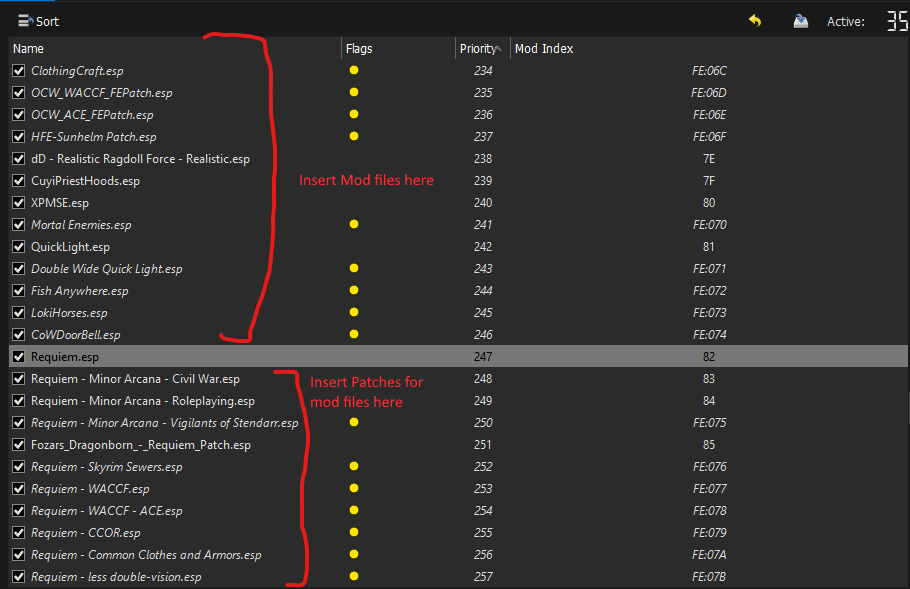
-
Any mods which don’t Add new NPCS, followers, Spells, armors and weapons, should be installed below the Wildlander Full mod(E.g. Autosave manager, bathtubs Basins and beyond, tentpalooza)
-
Run the Reqtificator whenever you change the load order. The Reqtificator is located in mod organizers drop down menu (top right)
Close mod organizer - and use the launcher to start the game.
Can I add…..?
How are we supposed to know? There are over 50,000 mods on nexus, There is no way anyone can tell you if a mod is going to cause problems or not.
Things to check
- Is there already a guide for it available (our discord server is the best resource for this)
- Are there any mod conflicts from Mod organizer tool - this will tell you if the files being changed as touched by any other mods in the list. You would see this by looking at Mod organizers “information” panel to see if any files are overwritten by your new mod.
- Record conflict resolution. The next thing to check is the actual ESP/ESL/ESM files for conflicts. I would recommend the following guide https://tes5edit.github.io/docs/5-conflict-detection-and-resolution.html to help you to learn how to check for mod conflicts within SSEEdit. If there are any then most likely you would need to write a conflict resolution patch.
- Does the mod you want to add have implementation notes on the Roadmap. Approx 300 mods have been checked against the base list and have notes as to what is required to integrate with the list.
Can I Remove…..?
The Wildlander mod itself has a lot of Master files (144 plugins) which cannot be disabled without removing all of the relevant records from Wildlander.esp.
Files which are masters are required by the mod itself, and disabling the master will cause the game to crash.
I’m commonly asked about the following mods. They are all Masters of Wildlander and cannot be removed:-
- Suspicious city guards
- Sunhelm (can be turned off in the MCM and ignored. Cannot be removed)
- Frostfall (can be turned off in the MCM and ignored. Cannot be removed)
- Immersive Horses
- Skyrim Unbound Reborn (this is responsible for all of the Wildlander “background configuration” of MCM’s and the like when you start the game.)
- Requiem is the core mod in this pack - (It’s literally the heart and soul of the modlist - without it you aren’t playing Wildlander) .
For anything else read the advise Here about uninstalling mods mid-play-though.
How do I Requiem Patch a armor/weapon mod for inclusion?
First thing you need to do is to take a look at the mod in SSEEDIT for these specific things
- Does AR/damage to match the material tier. (E.G orcish) or making sure it uses a vanilla tier keyword .
- Does it have NPC distribution (E.G via SPID) or will you need to patch them in levelled lists.
- Do things need removing such as “its in a new chest at the back of breezehome which you can access at level 1”
- Do the crafting need moving it to a appropriate crafting station (E.G if it needs tanning rack - move it to player crafting)
- Do you need to add crafting/tempering/breakdown recipes - Some mods are only designed to be added via console
- Making sure crafting/temping uses the appropriate perks & a SUITABLE amount of materiels for the material tier. (E.G saw a daedric armor which only needed 2 rubies, 1 lump of coal and 1 ingot of steel to make a chestplate)
- Do you need to remove or replace any OP, weird and whacky enchants (E.G summons a meteor to your location which does 250 unblockable damage to everything in 50 Yards)
- Making sure that any weapons have applicable damage type keywords (Eg Sword, mace, Warhammer)
Next is to create a patch file which resolves all of those issues.
I’ve added mods and I’m getting crashes to desktop!
Firstly - Check our crash help - it maybe you are getting one of the crashes from Wildlander itself
If your issue isn’t listed - then the below resources may help you identify what is going wrong.
A quick guide to NetScriptFramework Error Codes https://web.archive.org/web/20221118040759/https://www.nexusmods.com/skyrimspecialedition/articles/3031 More crash help here https://github.com/Fikthenig/Crash-Bonanza
I’ve added mods and my guards are Bandits!
The way skyrim works is to “bake” Npc’s into your save. As soon as they spawn they are stored in the format XXYYYYY - XX being the relevant part - as that is the Plugin Load order, with YYYYYY being the formID.
If you add/remove mods AFTER a npc is stored in your save and change the load order number (E.G change requiem from slot 82 to 93) then the game can’t find the NPC any more using the save stored reference, and rather than crash horribly, it picks a random appearance from skyrim.esm which never changes load order and is always in position 00.
All of the guards are defined in either Requiem itself, or are created in requiem for the indifferent, but there are other mods which create NPC’s which may also exhibit this issue such as Inconsequential NPC’s and Good folk of Raven Rock.
You cannot fix this, other than simply to start a new game and not add mods mid playthough.
Tools
Creation Kit
- Download and install into steam Folder : https://store.steampowered.com/app/1946180/Skyrim_Special_Edition_Creation_Kit/
- Open a command window “Run” by pressing «Win + R» and then enter the command: steam://open/console, and then press Enter. This will open console tab on your Steam
- On the bottom will have a space for you to enter the code. Enter these codes, one at a time and WAIT FOR THEM TO CONFIRM THAT THEY ARE DONE DOWNLOADING before entering next one
- download_depot 1946180 1946182 5099162879680505807
- download_depot 1946180 1946183 1633303557398589581
- It will download the files to your “Steam/steamapps/content/app_1946180/” folder. If you cannot find it, just seach on the steam folder: “depot 1946182” “depot 1946183” after download is done.
- Replace your “Steam/steamapps/commom/Skyrim Special Edition” files with the ones you just downloaded
- Copy Papyrus Compiler folder from “Steam/steamapps/commom/Skyrim Special Edition” into [Wildlander install folder]/Stock game
- Copy Creation kit.exe from “Steam/steamapps/commom/Skyrim Special Edition” into [Wildlander install folder]/Stock game
- Unzip “Steam/steamapps/commom/Skyrim Special Edition/Data/Scripts.zip” into [Wildlander install folder]/Stock game/Data
- Download https://www.nexusmods.com/skyrimspecialedition/mods/20061 and unzip contents into [Wildlander install folder]/Stock game
When starting Creation Kit now via Mod Manager 2, it throuws a warning regarding wrong version, but it works
Papyrus Compiler SE
1) Download and install creation kit as per above instructions 2) Open program from mod organizer

3) from above screen click cog icon 4) Set Skyrim SE folder to Game-files\Stock game 5) Set papyrus compiler to Game-files\Stock game\Papyrus Compiler
Dyndolod
DynDOLOD is an optional mod that greatly improves the appearance of distant terrain. It can affect your framerate, but the impact isn’t too bad and the visual difference is well worth it.
There is nothing unique about Wildlander DynDOLOD settings. Simply follow Phoenix’s excellent guides: first the SSELODGen guide, then the subsequent DynDOLOD guide.
Reqtificator
The Reqtificator should be configured as follows:

Note: levelled lists should be unticked and manually controlled, to prevent excessive amounts of unintended items being added when CCOR’s lists are merged into requiems.
Nemesis
- Most important - before doing anything - You have to add Nemesis Engine to the windows defender exception list, or whatever Anti Virus you are running otherwise it will crash on startup.
- Install your animation mods as normal.
- Run Nemesis from Mod organizer drop-down.
The following Video shows a tutorial of how to install some Nemesis Animations Skyrim 2022 Ultra Modded - Animation mod recommendations and how to install - Wildlander
The video covers most of it and I already linked to the timestamp that is really important, but there are a few edge cases still left.
Q: I have followed the tutorial but my animations don’t show up/Nemesis just throws up something like: Initializing Engine update, engine update complete 15 seconds. But none of my extra animation mods are referenced.
A: Click Launch Nemesis Engine and not Update.
Q: I clicked Launch Nemesis engine and now I am getting an access error or some other sort of crash.
A: You have to add Nemesis Engine to the windows defender exception list, or whatever Anti Virus you are running. For Windows defender, go to its system and add “Nemesis Unlimited Behavior Engine.exe” Process to the exclusion list. It should look something like this.

Resaver - Save cleaner and script remover.
This tool is useful for removing Bugged/crashed scripts from your save and correct script-lag.
I strongly recommend reading the mod page And/or watching tutorial videos before using.
ReSaver from FallrimTools: https://www.nexusmods.com/skyrimspecialedition/mods/5031?tab=files
Xedit / tes5edit/ SSEedit
If you want to mod Wildlander - then you need to know how to use this tool to check for conflicts.
The bible for the tool is located https://tes5edit.github.io/docs/
Submitting Patches
Should you wish to submit a Guide containing multiple patches you can do so here https://forms.gle/BFnvGTPpAhTYjw8q9
Guides
The discord is the best place to find assistance on how to add mods.
There are a lot of Mods which have been confirmed working as plug and play. These are located in the confirmed-working channel on discord. In addition there is also discussion of how to add specific mods (including NSFW nude mods) in the Specific-mods-discussion channels.
Discord staff do monitor these channels for bad advice and incorrect information.
SkyrimUpscalerENBTestBuild AKA DLSS Patreon for Wildlander
Submitted By weedinabottle#3376
What does the guide explain how to do? How to configure settings to use upscaler with Wildlander
Link to the guide https://docs.google.com/document/d/1GClUaIde1RWJfQExFqeo2bjvHKgeaR5u43pO2BhmyJI/edit?usp=sharing
“No Current Location” for immersion
Submitted By GugaRJ
What does the guide explain how to do?
Using multiple mods removes location mark on the map and makes camera to center Whiterun. It’s far from perfect but it does its job to bring back the feeling of exploration.
Link to the guide https://docs.google.com/document/d/1CxX9ES1rXOCqYCr4klWPnfOJ_hqNwF-JOrYP3xO1tlI/edit
Experience + Requiem - Static Skill Levelling + Synthesis patcher installation guide
Submitted By Hazarduss / Pittiwan1
What does the guide explain how to do?
Hello. This is an update of Hazarduss’ illustrated guide to completely change the character advancement system, integrating Experience SE and (optionally) Static Skills add-on to Requiem/Wildlander through the tool Synthesis Patcher.
If you use only Requiem - Experience SE:
1 – Skills continue to advance with use. 2 – But the skill advancement no longer contributes to your experience. 3 – You can get the exp needed to level up (and earn perks) exclusively by completing quests, killing enemies, reading some books and discovering new locations. 4 –The more powerful the opponent you defeat, the more XP you earn (a dragon counts more than a rabbit…) 5 – All quests help increase your XP. This also includes Wildlander missives! 6 – It is possible to remove skills from skill books (I kept them).
If you use also Static Skills add-on:
1 – Skills stop advancing with use. 2 – When you level-up and sleep, you can choose where to allocate new skills points.
Link to the guide
The updated guide is available at this link (thanks to Hazarduss for the beautiful work and for giving me the permission to publish it): https://docs.google.com/document/d/1FPgt4w6hW2XYf_F4nOtjJ5thI9Hd_QALoQGIY4Rv12U/edit?usp=sharing
Note
I think this mechanism, partly similar to that of 3Tweaks, fits very well to Requiem and especially Wildlander. In particular, I appreciated the way it values the missives and enhances the early game, which in my opinion is the best part of the Wildlander experience.
I personally chose to add only Experience SE (without Static Skills) to my list, because I’m too fond of the concept of skills that improve with use since the days of Morrowind, and I didn’t want to completely deprive myself of that. But it’s probably just a sentimental thing